As an alternative to the standard PPTP VPN connection, SwissVPN now operates a service using OpenVPN. While PPTP is still the recommended protocol, OpenVPN may be able to pass through firewalls and proxy servers where PPTP cannot get through.
The OpenVPN configuration for SwissVPN only requires outbound TCP connections on port 1194 to be allowed (and a working DNS service, of course).
-
Download our prepared Viscosity configuration and save it in a place where you can find it easily (e.g. your desktop).

-
Download and install Viscosity. This software costs $9, but there is a free 30 day trial. We currently only recommend this software for OpenVPN connections under Windows as it gives the best user experience and success rates compared to other options.

-
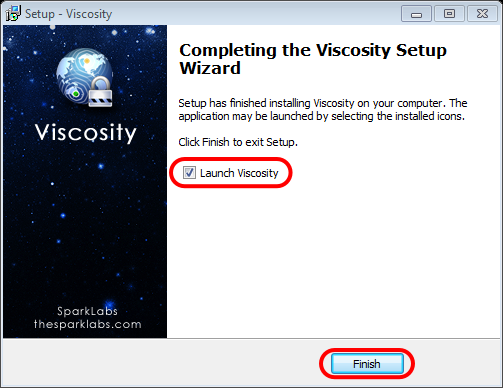
Nachdem Sie Viscosity gestartet haben, müsste sich das Viscosity-Symbol in der Taskleiste befinden.

-
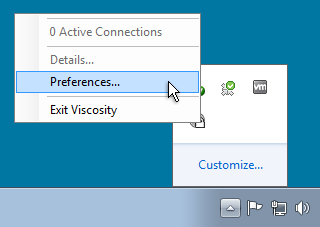
Open Viscosity, right click the Viscosity menu and select "Preferences...". The preferences window should appear.
-
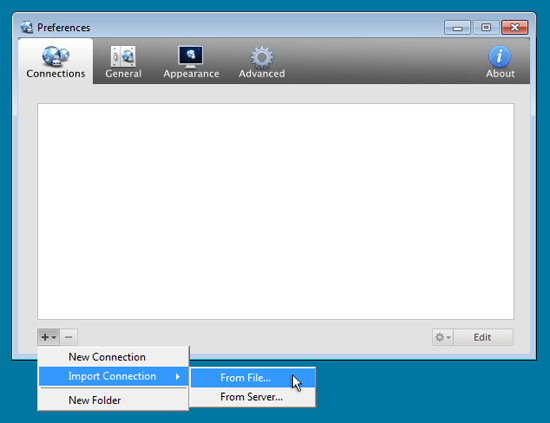
Make sure the "Connections" toolbar item is selected, and then click the "+" button in the bottom left hand corner of the window. Highlight "Import Connection" then select "From File..." from the menu that appears.
-
Choose the swissvpn.visz file that you downloaded in the first step. Click the "OK" button.
-
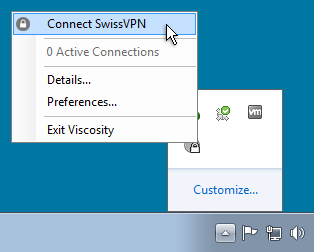
Your connection will now appear in the Viscosity menu. To connect, choose "Connect SwissVPN" from the menu in the bottom right corner of your screen.
-
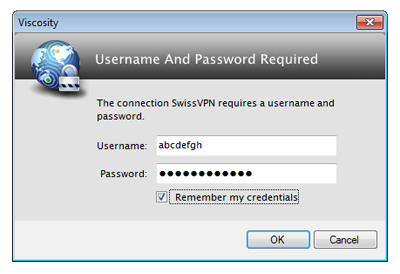
Enter your SwissVPN username and password in the dialog box and click OK.

-
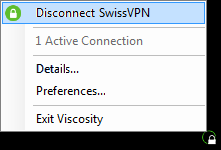
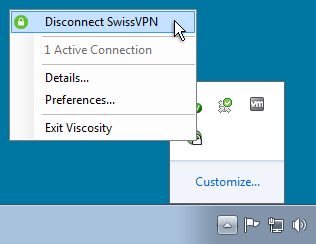
If the connection is successful, the icon will turn green and all connections to the Internet will use your SwissVPN tunnel.
-
You are now connected to SwissVPN!
To verify that all your connections to the Internet pass through your secure SwissVPN connection, simply visit www.swissvpn.net and check the indicator.
To disconnect, choose "Disconnect SwissVPN" from the menu in the bottom right corner of your screen.